About Me

PhD, NET(UGC), MBA (Finance), M.com (Finance), B.COM (professional), B.Ed (Commerce + English), DIM, PGDIM, PGDIFM, NIIT Accounting package...
Showing posts with label GST. Show all posts

Wednesday, February 19, 2020

Composition scheme under GST

1. Who can opt for Composition Scheme

A taxpayer whose turnover is below Rs 1.0 crore* can opt for Composition Scheme. In case of North-Eastern states and Himachal Pradesh, the limit is now Rs 75* lakh.

As per the CGST (Amendment) Act, 2018, a composition dealer can also supply services to an extent of ten percent of turnover, or Rs.5 lakhs, whichever is higher. This amendment will be applicable from the 1st of Feb, 2019. Further, GST Council in its 32nd meeting proposed an increase to this limit for service providers on 10th Jan 2019*.

Turnover of all businesses registered with the same PAN should be taken into consideration to calculate turnover.

*CBIC has notified the increase to the threshold limit from Rs 1.0 Crore to Rs. 1.5 Crores.

*Update as on 10th Jan 2019

As per 32nd GST Council Meeting held on 10th Jan 2019, Service Providers can opt into the Composition Tax Scheme, and the Government has set the threshold turnover for service providers at Rs. 50 lakhs to be eligible for this scheme.

2. Who cannot opt for Composition Scheme

The following people cannot opt for the scheme-

  • Manufacturer of ice cream, pan masala, or tobacco
  • A person making inter-state supplies
  • A casual taxable person or a non-resident taxable person
  • Businesses which supply goods through an e-commerce operator

3. What are the conditions for availing Composition Scheme?

The following conditions must be satisfied in order to opt for composition scheme:

  • No Input Tax Credit can be claimed by a dealer opting for composition scheme
  • The dealer cannot supply GST exempted goods
  • The taxpayer has to pay tax at normal rates for transactions under the Reverse Charge Mechanism
  • If a taxable person has different segments of businesses (such as textile, electronic accessories, groceries, etc.) under the same PAN, they must register all such businesses under the scheme collectively or opt out of the scheme.
  • The taxpayer has to mention the words ‘composition taxable person’ on every notice or signboard displayed prominently at their place of business.
  • The taxpayer has to mention the words ‘composition taxable person’ on every bill of supply issued by him.
  • As per the CGST (Amendment) Act, 2018, a manufacturer or trader can now also supply services to an extent of ten percent of turnover, or Rs.5 lakhs, whichever is higher. This amendment will be applicable from the 1st of Feb, 2019.

4. How can a taxpayer opt for composition scheme?

To opt for composition scheme a taxpayer has to file GST CMP-02 with the government. This can be done online by logging into the GST Portal.

This intimation should be given at the beginning of every Financial Year by a dealer wanting to opt for Composition Scheme.

Here is a step by step Guide to File CMP-02 on GST Portal.

5. How Should a Composition Dealer raise bill?

A composition dealer cannot issue a tax invoice. This is because a composition dealer cannot charge tax from their customers. They need to pay tax out of their own pocket.

Hence, the dealer has to issue a Bill of Supply.

The dealer should also mention “composition taxable person, not eligible to collect tax on supplies” at the top of the Bill of Supply.

6. What are the GST rates for a composition dealer?

Following chart explains the rate of tax on turnover applicable for composition dealers :

Composition-Scheme---Applicable-GST-Rates

As per notification dated 01.01.2018, turnover in case of traders has been defined as ‘ Turnover of taxable supplies of goods’.

7. How should GST payment be made by a composition dealer?

GST Payment has to be made out of pocket for the supplies made.

The GST payment to be made by a composition dealer comprises of the following:

  • GST on supplies made.
  • Tax on reverse charge
  • Tax on purchase from an unregistered dealer*

*Only on the specified categories of goods and services and well as the notified class of registered persons with effect from 1st Feb 2019 but is yet to be notified. Hence, not applicable until then.

8. What are the returns to be filed by a composition dealer?

A dealer is required to file a quarterly return GSTR-4 by 18th of the month after the end of the quarter. Also, an annual return GSTR-9A has to be filed by 31st December of next financial year*.

*Update as on 22nd December 2018: Due date for filing GSTR-9, GSTR-9A and GSTR-9C is extended till 30th June 2019 by CBIC for FY 2017-18

Latest update on Due dates:

Due date for GSTR-4 for the period Oct-Dec 2018 is 18.01.2019

Also, note that a dealer registered under composition scheme is not required to maintain detailed records.

9. What are the advantages of Composition Scheme?

The following are the advantages of registering under composition scheme:

  • Lesser compliance (returns, maintaining books of record, issuance of invoices)
  • Limited tax liability
  • High liquidity as taxes are at a lower rate

10. What are the disadvantages of Composition Scheme?

Let us now see the disadvantages of registering under GST composition scheme:

  • A limited territory of business. The dealer is barred from carrying out inter-state transactions
  • No Input Tax Credit available to composition dealers
  • The taxpayer will not be eligible to supply exempt goods or goods through an e-commerce portal.

Here is a video to understand about composition scheme under GST

www.cleartax.in

Reverse charge under GST

1. What is Reverse Charge?

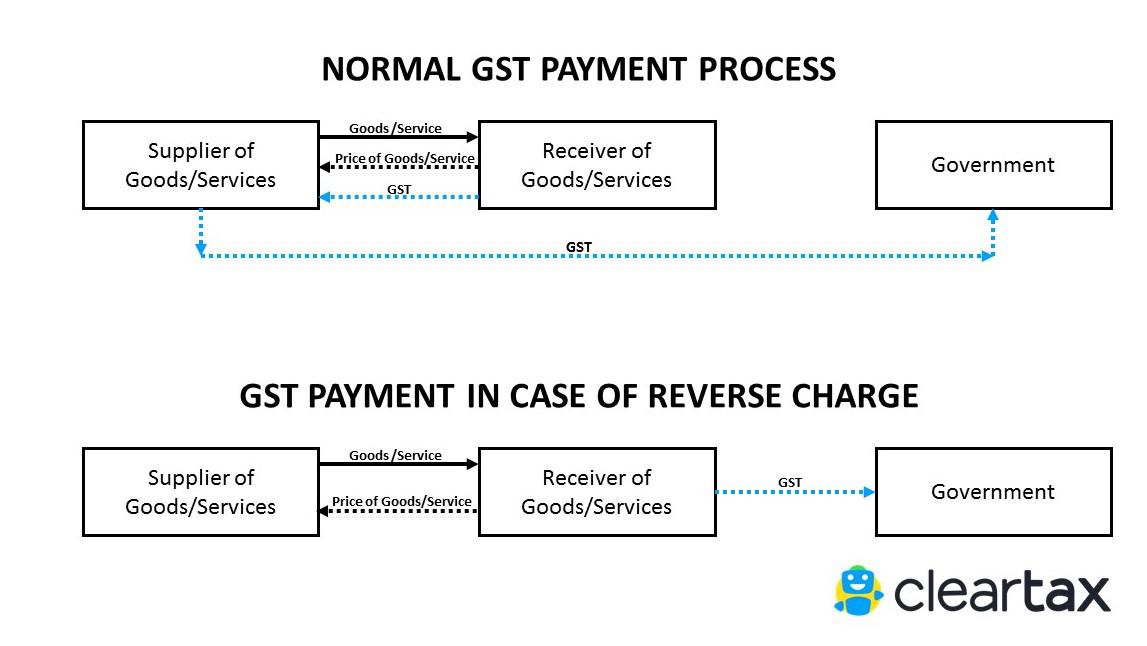
Normally, the supplier of goods or services pays the tax on supply. In the case of Reverse Charge, the receiver becomes liable to pay the tax, i.e., the chargeability gets reversed.

Reverse Charge under GST

2. When is Reverse Charge Applicable?

A. Supply from an Unregistered dealer to a Registered dealer

If a vendor who is not registered under GST, supplies goods to a person who is registered under GST, then Reverse Charge would apply. This means that the GST will have to be paid directly by the receiver to the Government instead of the supplier.

The registered dealer who has to pay GST under reverse charge has to do self-invoicing for the purchases made.

For Inter-state purchases the buyer has to pay IGST. For Intra-state purchased CGST and SGST has to be paid under RCM by the purchaser.

B. Services through an e-commerce operator

If an e-commerce operator supplies services then reverse charge will be applicable to the e-commerce operator. He will be liable to pay GST.

For example, UrbanClap provides services of plumbers, electricians, teachers, beauticians etc. UrbanClap is liable to pay GST and collect it from the customers instead of the registered service providers.

If the e-commerce operator does not have a physical presence in the taxable territory, then a person representing such electronic commerce operator for any purpose will be liable to pay tax. If there is no representative, the operator will appoint a representative who will be held liable to pay GST.

C. Supply of certain goods and services specified by CBEC

CBEC has issued a list of goods and a list of services on which reverse charge is applicable.

3. Time of Supply under Reverse Charge

A. Time Of Supply in case of Goods

In case of reverse charge, the time of supply shall be the earliest of the following dates:

  • the date of receipt of goods
  • the date of payment*
  • the date immediately after 30 days from the date of issue of an invoice by the supplier

If it is not possible to determine the time of supply, the time of supply shall be the date of entry in the books of account of the recipient.

*This point is no more applicable based this Notification No. 66/2017 – Central Tax issued on 15.11.2017

Illustration:

  1. Date of receipt of goods 15th May 2018
  2. Date of invoice 1st June 2018
  3. Date of entry in books of receiver 18th May 2018

The Time of supply of service, in this case, will be 15th May 2018

B. Time Of Supply in case of Services

In case of reverse charge, the time of supply shall be the earliest of the following dates:

  • The date of payment
  • The date immediately after 60 days from the date of issue of invoice by the supplier

If it is not possible to determine the time of supply, the time of supply shall be the date of entry in the books of account of the recipient.

Illustration:

  1. Date of payment 15th July 2018
  2. Date immediately after 60 days from the date of issue of invoice (Suppose the date of invoice is 15th May 2018, then 60 days from this date will be 14th July 2018)
  3. Date of entry in books of receiver 18th July 2018

The Time of supply of service, in this case, will be 14th July 2018

4. What is Self Invoicing?

Self-invoicing is to be done when you have purchased from an unregistered supplier AND such purchase of goods or services falls under reverse charge.

This is due to the fact that your supplier cannot issue a GST-compliant invoice to you, and thus you become liable to pay taxes on their behalf. Hence, self-invoicing, in this case, becomes necessary.

To create such an invoices on ClearTax GST software, follow the below steps:

Step 1 – Click on ‘+ New Purchase Invoice’ to create a new invoice

pasted image 0 (2)

Step 2 – As you can see, you need to fill data in multiple fields. Let’s understand each field in detail:

1. Enter the serial number of the bill into the field marked ‘Invoice Serial Number’. Since your supplier has not issued an invoice and you are creating an invoice on their behalf, you need to add a serial number on your own. You can create and maintain a serial number series for reverse charge bills, for easier invoicing

2. Enter the ‘Invoice Date’. This date must be based on time of supply

3. Enter any detail such as the order number etc., into the field marked ‘Reference Number’

4. Under ‘Due Date’, you have to mention the date by when you have to make the payment to the supplier for the purchase you made (mentioning this date is not mandatory)

5. Under ‘Vendor Name’, enter the supplier’s name. Remember this name cannot be your own name, even if you are doing self-invoicing under reverse charge

6. In case the vendor’s name is not set already, you can add a new vendor

7. Enter details of goods/ services purchased

8. From the drop-down under ‘Advance Settings’, select ‘Reverse Charge’

9. Now, fill in all the details displayed on your screen.

Step 3 – After filling all the other details, click on Save.


For more details

www.cleartax.in

Uploading invoice

Process of Uploading Invoices on GSTN

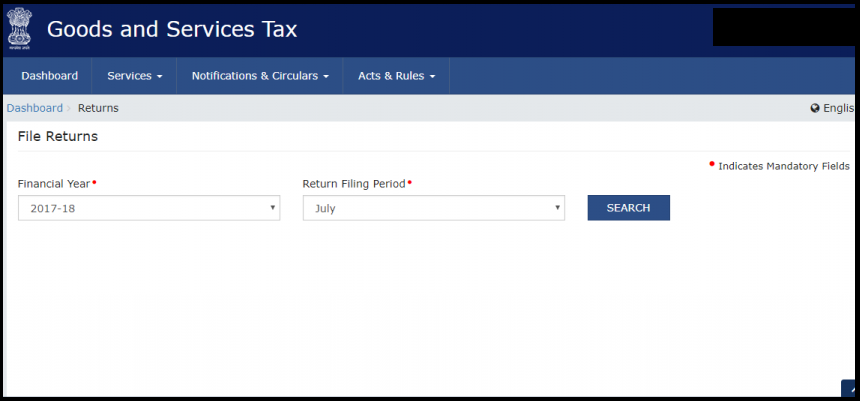
Go to website gst.gov.in>>Dashboard>>Service>>Returns>>>>Returns Dashboard>>File returns>>Details of outward supplies of goods or services>> Prepare online OR Prepare Offline

gstn 1

gstn 2

gstn 3

Preparing Offline

You need to upload a JSON file. For that, you need to convert your excel file to JSON file.

gstn 4

Preparing online

You will have many options such as:

  • B2B
  • B2C (Large invoices)
  • Credit/debit Notes

Click which is appropriate>>Add invoice>>Fill up details>>Save

gstn 5
Examples

B2B

gstn 6

You can select export sales, sales to SEZ, sales through e-commerce etc.

gstn 7

B2C

gstn 8

You can also fill in sales made through places like Amazon-

gstn 9

Day One Experience of Uploading Invoices on GSTN Portal

The website is clear and easy to use. There are separate types of invoices to choose from and you can fill up the details accordingly.

Problems we faced while uploading on GSTN Portal

  1. It is difficult to find out where one should upload invoices
  2. Only JSON files will be allowed to be uploaded. So, you must convert your excel sheet of invoices to JSON mode
  3. Entering all bills one by one will be time-consuming

https://cleartax.in/s/uploading-invoices-on-gstn

Upload invoice under GST

How to Upload Invoice to GSTN

To file GSTR-1 return, persons having GST registration must upload details of all their invoices to the GSTN portal. In this article, we look at how to upload invoice to GSTN through multiple modes.

Invoice Details to Be Uploaded to GSTN

Every month to file GSTR-1 return, the taxpayer must upload details of all invoice issued during the last month on the GSTN portal. GSTN does NOT accept image copies of invoices in pdf or jpeg or gif format of any invoice. Only information pertaining to the invoice must be uploaded to GSTN in data format.

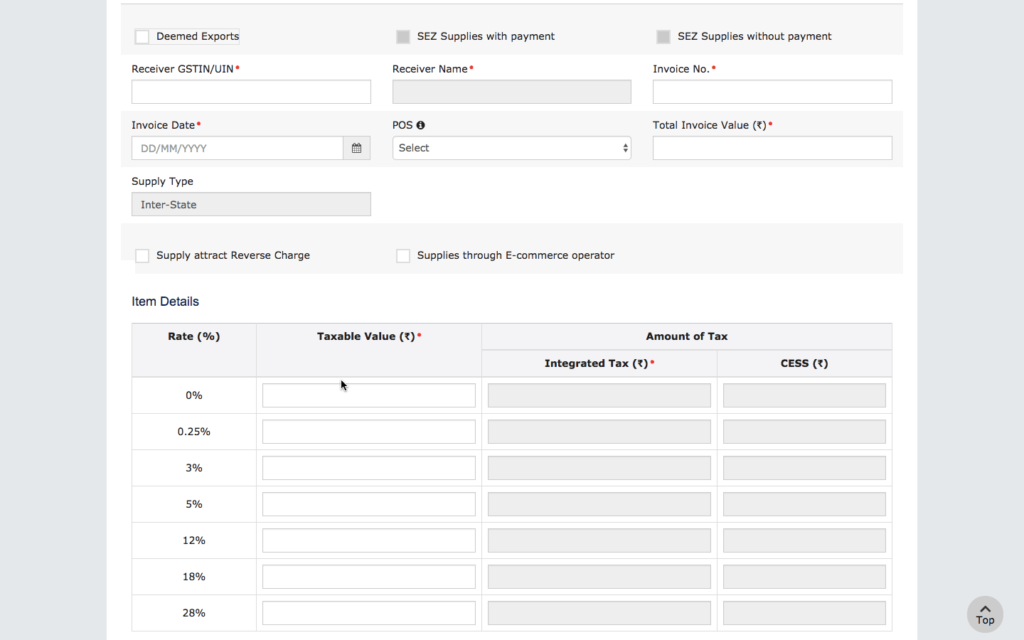
For B2B invoices, the following details must be uploaded on the GSTN:

  • Customers GSTIN
    • Based on the Customer’s GSTIN, the Customer Name as per GSTN will be completed automatically
  • Invoice Number
  • Invoice Date
  • Place of Supply
  • Total Invoice Value
  • Supply Type (Inter-State or Intra-State)
  • If supply is made through e-commerce operator
    • GSTIN of E-Commerce Operator
  • If the supply is an export
  • If the supply attracts reverse charge
  • If the supply was made to a SEZ unit
  • GST rate applicable (0%, 0.25%, 3%, 5%, 12%, 18% and 28%). If the invoice has multiple items, then items can be consolidated rate wise.
  • Taxable value for each of the GST rate slabs
  • Amount of GST applicable (IGST, CGST and SGST)

The screenshot below shows the information to be uploaded for a B2B invoice.

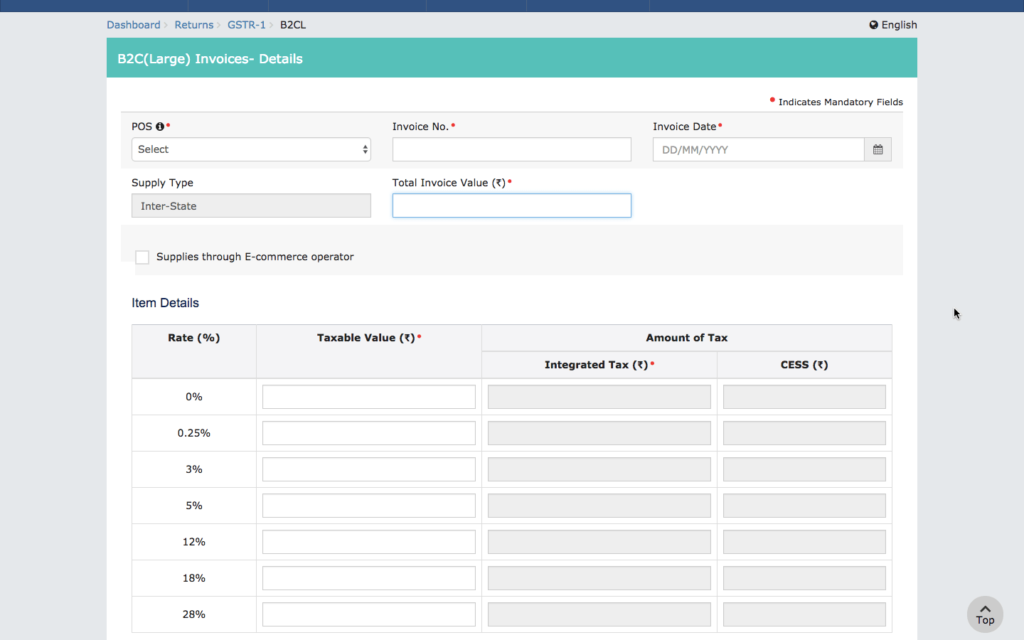
For B2C large invoices, the following details must be uploaded on the GSTN. B2C large invoices are invoices wherein the taxable value is more than Rs.2.5 lakhs.

  • Invoice Number
  • Invoice Date
  • Place of Supply
  • Total Invoice Value
  • Supply Type (Inter-State or Intra-State)
  • If supply is made through e-commerce operator
    • GSTIN of E-Commerce Operator
  • GST rate applicable (0%, 0.25%, 3%, 5%, 12%, 18% and 28%). If the invoice has multiple items, then items can be consolidated rate wise.
  • Taxable value for each of the GST rate slabs
  • Amount of GST applicable (IGST, CGST and SGST)

For B2C small invoices, only rate wise consolidated figures need to be uploaded on the GSTN. Hence, individuals invoices need not be uploaded for B2C invoices, wherein the taxable value is less than Rs.2.5 lakhs.

How to Upload Invoice to GSTN

There are multiple ways and tools available for uploading invoices to GSTN as follows:

LEDGERS GST Software

Businesses using LEDGERS GST Software for filing GST returns can upload invoice to GSTN directly from the software. Based on the invoices created on LEDGERS, GSTR-1 will be aut0-prepared. Further, in case other invoices were issued to a customer, they can be uploaded to LEDGERS using the excel upload tool. Once all the invoices for the month are uploaded on LEDGERS, the user can click on GST Filing – GSTR-1 – Overview, to view a summary of GSTR-1.

The user can click on File GSTR-1 to directly file the GST Return on the GST Portal. However, to file directly, the user will have to allow LEDGERS access to the GST Account and verify the same using the OTP generated. Alternatively, the user can also download a JSON file from LEDGERS, containing all the details for filing GSTR-1 along with invoice upload. This file can be uploaded on the GSTN and digitally signed to complete the GST filing through LEDGERS.


ManualOnline Upload of Invoice on GSTN

Users can also manually upload invoice to GSTN portal through their GST account. To manually upload invoice to GSTN, follow the steps below:

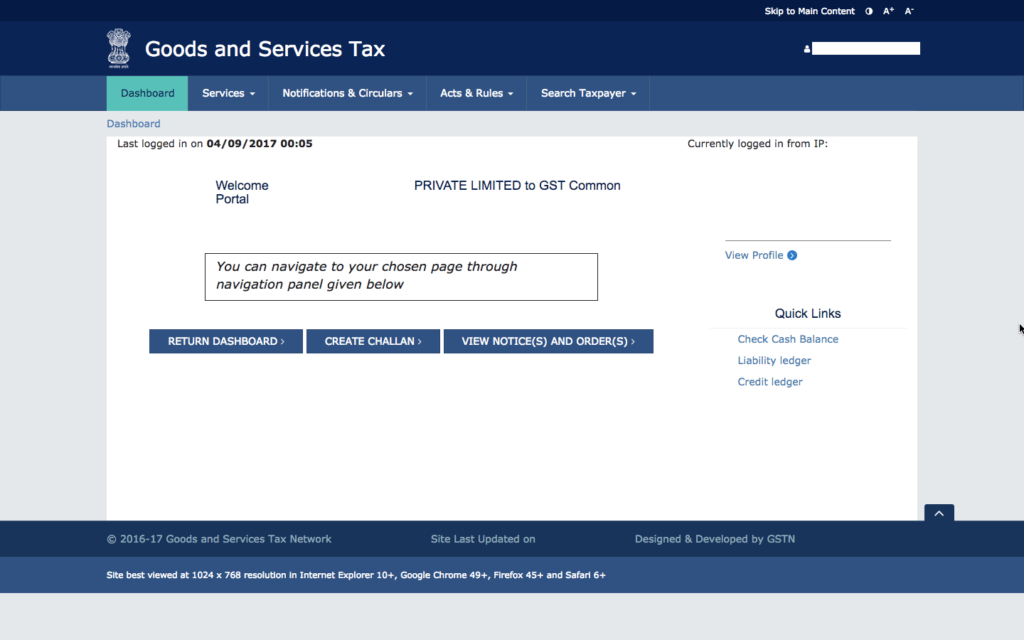
Step 1: Login to your GST account

GST Login
GST Login

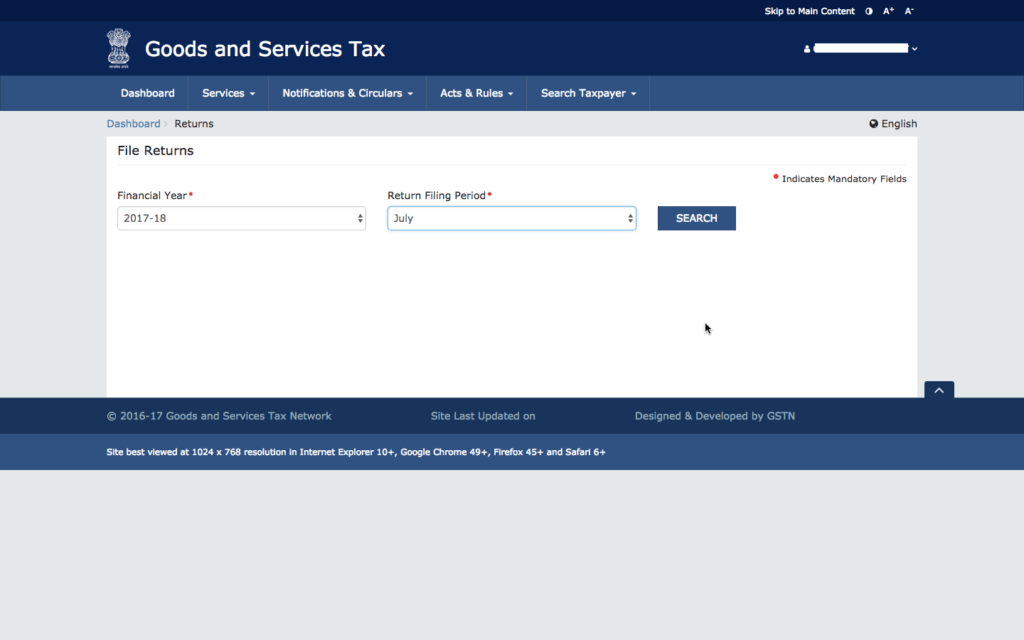
Step 2: Select the month for which you wish to upload GST invoices

Select Filing Month
Select Filing Month

Step 3: Select GSTR-1 Return and Click on Prepare Online

Step 4: Upload B2B Invoice Details

Select B2B invoices. Enter details of the invoices one by one, until details of all issued invoices are loaded on the GSTN portal. This method would be suitable only for entities have a few invoices every month. Entities having multiple B2B invoices would find this option time-consuming, as every invoice details must be manually entered into the system.

Upload B2B invoices to GSTN

Step 5: Upload B2C Large Invoice Details

Once all the B2B invoices are uploaded, B2C large invoice details must be loaded. Th procedure for uploading B2C large invoices is relatively simpler, as fewer details are required.

GSTR-1 B2C Large Invoice Manual Upload

On uploading the B2B invoices and B2C large invoices, the taxpayer is ready to provide other consolidated inforation like B2C small invoice, credit or debit notes, advances received, etc., Hence, only B2B invoice and B2C large invoice data must be uploaded on the GSTN.

Manual Offline Preparation of GST Return

In case you would like to prepare GSTR-1 return manually, you can use the GST offline return tool provided on the GST portal. The GST offline return tool is a .EXE file and works on Windows based computers. In the offline GST return tool, all the required information for GSTR-1 can be populated offline along with invoice upload. Once the details are prepared, the user can click on the download JSON button to get a JSON file with all the B2B invoice data and GSTR-1 return data. This file can be uploaded directly into the GST portal to complete the GST return filing.


https://www.indiafilings.com/learn/upload-invoice-gstn/

GST suvida Provider GSP

Who is a GST Suvidha Provider (GSP)?

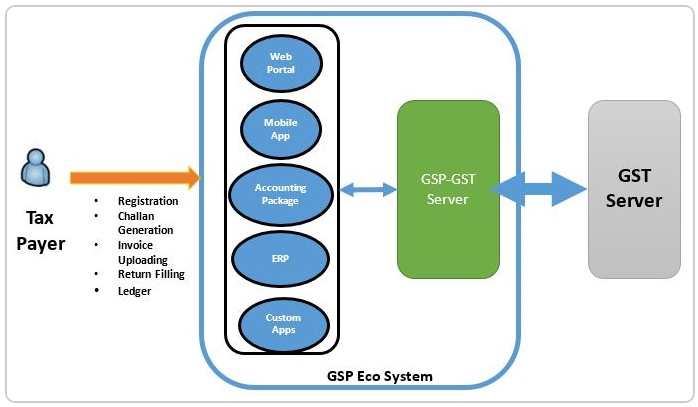
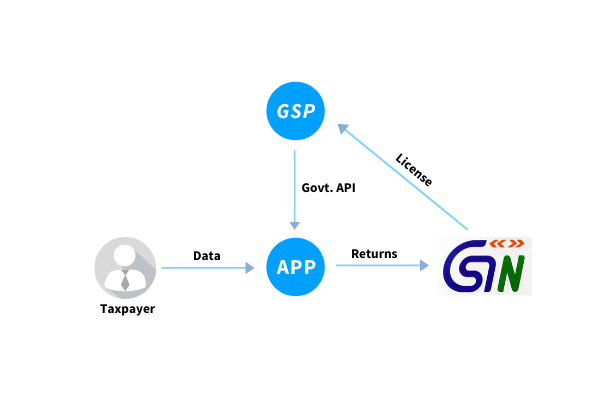
GSP stands for GST Suvidha Provider. A GSP enables a GST taxpayer to comply with all the procedural provisions of the GST law through its web platform. ClearTax, an online tax filing platform has been granted the status of GSP. A GSP provides innovative methods or means of an effective interactive platform for taxpayers to access GST portal services ranging from registration and invoicing to completion of GST return filing.

GSP Ecosystem
Image Courtesy: gstn.org

Understanding with an example:

Let’s take an example to understand it better:

ABC Ltd is a private multinational company, which is running operations on SAP ERP. All records with respect to purchases and sales are maintained in it. At the end of each month, reports are generated from ERP and utilised to prepare and generate tax returns. Thereafter, returns are uploaded on the government’s portal.

Our government is now aiming for single and automated workflow wherein these ERP companies can build an interface with government’s portal and all the GST related compliance can be done directly through their software.

GSP need not be only ERP companies but can be startups or financial technology companies having expertise in building web applications for filing GST returns such as ClearTax.

GSP – A Brainchild of Goods and Services Tax Network

GSP is a term coined by GSTN (Goods and Service Tax Network), the private non-government entity that owns and maintains the GST portal.

It is in-line with the ‘Digital India’ initiative that advocates a paperless tax compliance regime that enables transparency and reliability in doing business across India.

Three Modes of Interaction With GST portal


1) Filing directly on the GST portal

A GST taxpayer will usually access the website directly for availing various services offered on the website such as registration, GST return filing, refund application, and other similar GST compliances. However, for services such as GST return filing, a taxpayer may not be technically equipped to file online. Hence, they may find it difficult to collate sales and purchase data from his ERP system or accounting software in the required GSTN format. A lot of manual efforts may go into preparing the GST returns. Hence, a GST Suvidha Provider is an indirect means yet an easy platform to access the GST portal saving time and efforts.

Under indirect means, there are two types of intermediaries between the taxpayer and the GST portal. They are as follows:

2) ASP who is not a GSP:

These entities provide the requisite third-party applications for GST compliance. They have user interfaces via various modes such as desktop, mobile or any other interfaces for taxpayers just like any other Application Service Provider (ASP). Such an application developer can connect with the GST portal via a secure GST system Application Programming Interface (APIs) accessed with the help of GST Suvidha Providers.

The below diagram will show the two ways of how the taxpayers can access the GST portal indirectly through an ASP who is Non-GSP:

Interaction through ASP who is not a GSP

3) ASP who is also a GSP:

A government-approved application service provider is the most reliable mode of completing GST compliances. They provide the application and are also authorised to provide an interactive platform to access the GST portal. Such an ASP who is also a GST Suvidha Provider can connect seamlessly with the GST portal and helps avoid; any third-party dependency, thereby increasing the speed of processing of data. Also, an ASP which has access to multiple GSPs will ensure higher uptime availability and scalability for the user.

The below diagram will show the two ways of how the taxpayers can access the GST portal indirectly through an ASP who is also a GSP:

Interaction through an ASP who is also a GSP

Interaction of a taxpayer with the GST portal can, therefore, take place via either of the three routes as follows:
GSP
Overview of Interaction through GSP

Areas addressed by GST Suvidha Providers

  1. Upload invoice data (B2B and large value B2C).
  2. Upload GSTR-1 (return containing supply data), which will be created based on invoice data and some other data provided by the taxpayer.
  3. GSTR-2A download and reconciliationwith purchase data accounted on ERP.
  4. File GSTR-3B based on the GSTR-1 filed, purchase data on record and GSTR-2A information available.
  5. Similarly, there are other returns for other categories of taxpayers like casual taxpayer or composition taxpayers.

List of GSPs in India

Till November 2019, there have been three rounds of licensing for GST Suvidha Provider. In the first round of allotment of the license, thirty-four companies were granted GSP license. Read the 1st round of allottees here.
In the next round of licensing, around 42 companies were allotted the status of GSP as listed here.
In the latest round of GSP list announced in November 2019, 10 companies have joined the list as laid down here. ClearTax is a GSP authorised to connect to the GST Network using published APIs.

Benefits of being an ASP who is also a GSP

  1. Allows an end-to-end integration with any ERP system or accounting software so that data can be fetched automatically.
  2. Improved and faster performancecompared to any other ASP not being GST Suvidha Provider.
  3. The integration with the GSTN can allow a smooth flow of data between the application and the GST portal avoiding any third-party dependency.
  4. A single login is needed to accessdifferent locations (GSTIN) instead of login and logout each time from different locations.
  5. Better security ensured as all security standards are met and approved by GSTN.

https://cleartax.in

Thursday, January 16, 2020

CGST, SGST, UTGST, IGST

What Is Central Goods and Services Tax (CGST)?

It is an indirect tax levied and collected by the Central Government on the intra-state supplies. Such supplies do not include alcoholic liquor for human consumption. This tax levy is governed by the Central Goods and Services Act, 2017. And such a tax is levied on the transaction value of the goods or services supplied as per section 15 of the CGST Act. The transaction value is the price actually paid or payable for the said supply of goods or services.

Further, the liability to pay CGST shall arise at the time of supply of goods or services as specified in section 12 and 13 of the CGST Act. The SGST portion will also be levied on the same intra-state supply of goods. But SGST will be governed by the SGST Act, 2017.

Say for instance, Omkar Enterprises, a manufacturer in Punjab, supplies goods to Vipul Traders, a dealer in Punjab. Goods worth Rs 1,00,000 are supplied by Omkar Enterprises after adding GST @ 18%. Since it is an intra-state supply, GST gets deposited to both Central and State Governments. But the total GST amounting to Rs 18,000 gets deposited equally into separate heads. This means, Rs 9,000 gets deposited into CGST account. And another Rs 9,000 gets deposited into SGST head.

VI. What Is State Goods and Services Tax (SGST)?

It is an indirect tax levied and collected by the State Government on the intra-state supplies. Such supplies do not include alcoholic liquor for human consumption. This tax levy is governed by the State Goods and Services Act (SGST), 2017. And such a tax is levied on the transaction value of the goods or services supplied as per section 15 of the SGST Act. The transaction value is the price actually paid or payable for the said supply of goods or services.

Further, the liability to pay SGST shall arise at the time of supply of goods or services as specified in section 12 and 13 of the SGST Act. The CGST portion will also be levied on the same intra-state supply of goods. But CGST will be governed by the CGST Act, 2017.

VII. What Is Integrated Goods and Services Tax (IGST)?

It is an indirect tax levied and collected by the Central Government on the inter-state supply of goods or services. Such supplies do not include alcoholic liquor for human consumption. This tax levy is governed by the Integrated Goods and Services Tax Act, 2017. And the same is apportioned between Centre and State governments.

For instance, Prakash Ltd, a manufacturer in Punjab, supplies goods to Verma Traders, a dealer in Maharashtra. Goods worth Rs 1,00,000 are supplied by Prakash Ltd after adding GST @ 18%. Since it is an inter-state supply, GST gets deposited only to the Central Government. Therefore, total GST amounting Rs 18,000 gets deposited into CGST head only.

VIII. What Is Union Territory Goods and Services Tax (UTGST)?

It is an indirect tax levied and collected by the Union Territory on the intra-state supply of goods or services. Such supplies do not include alcoholic liquor for human consumption. This tax levy is governed by the Union Territory Goods and Services Act (UTGST), 2017. And such a tax is levied on the transaction value of the goods or services supplied as per section 15 of the CGST Act, 2017. The transaction value is the price actually paid or payable for the said supply of goods or services.

According to the UTGST Act, 2017, UTGST will be applicable on the following territories:

  • Andaman and Nicobar Islands
  • Lakshwadeep
  • Dadra and Nagar Haveli
  • Daman and Diu
  • Chandigarh
  • Other Territory

Delhi and Puducherry are the other two Union Territories. But this Act is not applicable there as they have their own State Legislature and Government. For both the territories, State GST is applicable.

AUDIT PLANNING: MEANING, OBJECTIVES, AND IMPORTANCE

📘 AUDIT PLANNING: MEANING, OBJECTIVES, AND IMPORTANCE ✅ Meaning of Audit Planning Audit Planning is the process of developing a compre...